TOOL 05 · SHIPPED · FREE · MIT · WINDOWS

everywho — who is touching the disk, right now.

Task Manager gives you a number. It does not tell you whose it is. everywho samples the kernel's own accounting for a few seconds and puts identity beside every row — the account, the working directory, and for a process belonging to a coding agent, its harness and the repository it is working in.

Download everywho WINDOWS Source
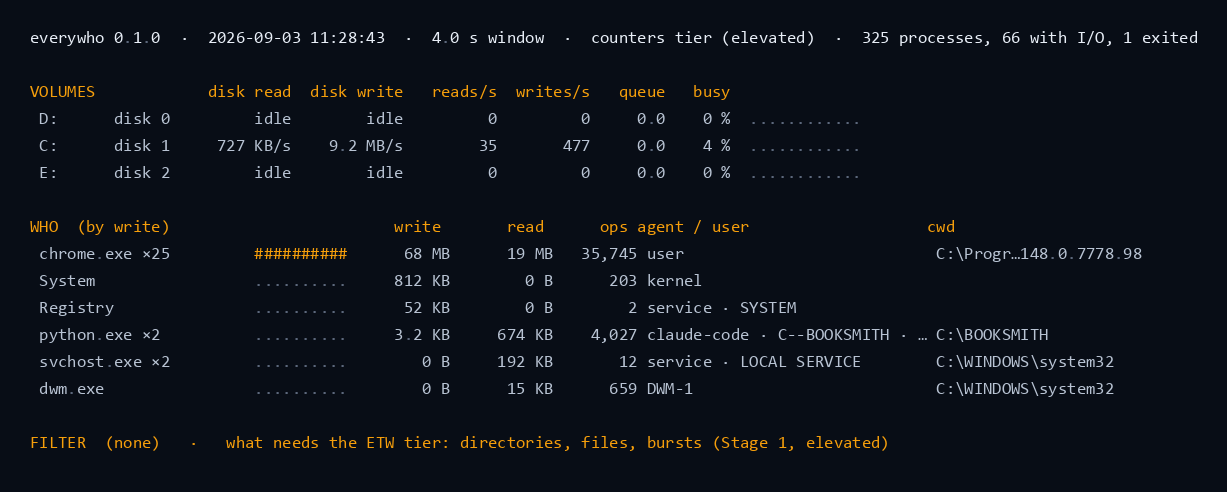
everywho's report over a four-second window on a 325-process machine: three volumes with their read and write rates, C: at 9.2 MB/s written and 4 percent busy; then the WHO table by write — chrome.exe folded from 25 processes at 68 MB, System at 812 KB, Registry, python.exe folded from 2 attributed to a claude-code agent working in C--BOOKSMITH, svchost.exe as LOCAL SERVICE and dwm.exe; and a last line saying directories, files and bursts need the ETW tier
THE REPORT, VERBATIM — SET IN CONSOLASA REAL 4-SECOND WINDOW
everywho C: dw 9.2M/s · q0.0 · busy 4% · chrome×25 68M · python×2 3.2K (claude-code) · 325 procs THE --stamp RECEIPT, VERBATIM
01 — WHY IT EXISTS

"Something is hammering the disk" is not an answer.

A machine that runs local models and several agents at once is a machine where the disk is always busy and nobody can say why. The built-in tools show a rate and a process name. They will not tell you that the writes belong to an agent session, which harness it is, or which repository it is working in — and on a box with three agents running, that is the only fact that matters.

everywho answers exactly that question and stops. It has no alerts, no thresholds and no opinion about whether a number is bad.

WHAT IT NEVER DOES
no driverNo kernel driver, no service, no filter, no hooks and no injection. The kernel's own accounting is the boundary; if a question cannot be answered from it, the answer is "not from user mode".
no contentsIt never opens or reads a file. Names, sizes, operation kinds and rates are the entire surface.
no daemonIt runs while you watch it. A trace session never outlives the process that started it — leaking one is the single bug that would hurt you after the tool has gone.
no verdictIt measures. Whether 68 MB in four seconds is a problem is your call, not the tool's.
no elevation, silentlyIt runs in whatever tier it has and says which. Elevation is asked for explicitly or not at all.
02 — WHAT IT READS

Two things, in one glance: the disks, and who is on them.

THE VOLUMES

Every physical disk with its drive letters: bytes read and written per second, reads and writes per second, queue depth and busy percent. An idle disk says idle rather than a row of zeros, so the eye goes to the one that is working.

THE PROCESSES

Bytes written, bytes read and operation counts over the window, sorted by whichever you ask for. Processes sharing an image name fold into one row with a count — chrome.exe ×25 — because twenty-five rows of Chrome is not information.

THE IDENTITY

Beside each row: the account it runs as (SYSTEM, LOCAL SERVICE, a user, kernel) and its working directory. That last one turns "python.exe" into something you can act on.

03 — THE AGENT COLUMN

Which agent, in which repository.

This is the column nothing else on a Windows box gives you. A process that belongs to a coding agent is named as one: the harness it runs under and the project it is working in, resolved from the process tree rather than guessed from a window title.

When three agent sessions share a machine and one of them is thrashing an NVMe, this is the line that ends the argument. It is also the line that lets an agent discover it is the culprit itself.

WHO (by write) write read ops agent / user cwd chrome.exe ×25 68 MB 19 MB 35,745 user python.exe ×2 3.2 KB 674 KB 4,027 claude-code · C--BOOKSMITH C:\BOOKSMITH svchost.exe ×2 0 B 192 KB 12 service · LOCAL SERVICE C:\WINDOWS\system32
THREE ROWS FROM A REAL WINDOW
04 — WHAT IT CANNOT DO YET

It knows who and how much. It does not yet know what.

This is the counters tier. everywho cannot name the directories or the files behind a number — that needs a kernel trace session, which is the next stage and is not built. Until it is, the tool says so on the last line of every report rather than letting you assume otherwise:

FILTER (none) · what needs the ETW tier: directories, files, bursts (Stage 1, elevated)

Its own --help lists the flags that belong to that stage and are not in this build. Shipping the honest half first is deliberate: a tool that guessed at file names would be worse than one that names the question it cannot answer.

And it can miss a process that does not outlive the window

This tier reads each process's I/O counters at the edges of its sampling window, so a process that starts and exits between two samples takes its bytes with it. Measured against a planted workload of 129.8 MB from four short-lived processes, everywho attributed 24.9 % of it at the default 500 ms window, 49.8 % at 100 ms and 76.9 % at 60 ms. Nothing is wrong with the arithmetic — that is what sampling counters is, and it is exactly what an event-time tier removes. Long-running processes, which is what you are usually chasing, are unaffected. The oracle that measured this is in the repository as tests/plant and tests/harness.
WHAT IS BUILT AND GREEN
the reporta sampled window, volumes and processes, folded, sorted and filtered
the TUI-w live, with sort, group, pause, freeze and a 1 / 10 / 60-second window
JSON-j one snapshot; -j -w an NDJSON stream
the receipt--stamp, one line, for a log or an agent's notes
the lane--spool, change-gated, for a tailer
MCPread-only: io_snapshot, io_stamp
the oracle--selftest — formatting, rates, tapes, name mapping, identity rules and live counters
05 — FOR THE AGENT

An agent can find out that it is the one thrashing the disk.

The same numbers a human reads in the report come back as one JSON object, or as a stream, or as a single line an agent can paste into its own log. Nothing in the interface writes anything or changes anything: it is a measurement, and measurements are safe to give away.

Exit codes mean something: 0 ok · 1 arguments · 2 collector error, with the JSON still emitted · 3 selftest failed · 4 needs elevation for what was asked.

THE VERBS
io_snapshotthe sampled window as an object: volumes, processes, identity
io_stampthe one-line receipt, for a log
claude mcp add everywho -- everywho.exe --mcp

Free, MIT, one exe, no installer.

Windows 10 1809 or later, x64. It runs unelevated and says which tier it is in; the counters tier needs nothing special. The binary is unsigned, so Windows will warn on first run.

Download the latest release ← the rest of the shop